Work Log Pro
AR Productions Inc.Productivity
4.62.57K Reviews
- Version
- 12
- Installs
- 100.00K
- Age Rating
- Everyone
Screenshots
Our Review of Work Log Pro
 Analysis by Appyee
I judge a work-hours app less by how impressive its feature list sounds and more by whether I can trust the record when a client, manager, or payroll deadline asks for it. Work Log Pro is built around that practical job: keeping shifts and hours in one place, rather than turning time tracking into a complicated project. That focused approach is appealing, though it also means the app is best suited to people whose needs really are centered on logging work.
What the price means in practice
Work Log Pro is a paid app at $9.99. I would treat that as a one-time purchase decision only if the store purchase flow confirms the terms for your device; I wouldn’t assume a subscription, a free trial, or a free tier from the app’s name. The sensible question is whether a reliable work record is worth that price for the way you earn or organize your time.
Its Everyone age rating makes it broadly suitable from a content perspective, but that is separate from whether it fits a particular job. The app is a productivity tool from AR Productions Inc., and it has been available since July 14, 2013. Its current version is 12, which suggests a long-running product, though longevity alone cannot tell me how well it matches a current workplace’s reporting rules.
Where a simple log can earn its keep
The strongest case for paying is regular use. If I work changing shifts, take hourly freelance jobs, or need to remember hours across several clients, a dedicated log can prevent a small memory lapse from becoming an inaccurate invoice or a confusing timesheet. Recording the work close to when it happens is more dependable than reconstructing a week from messages and calendar entries.
For someone with fixed hours and an employer-provided clock-in system, the value is less obvious. That official system may already be the record that payroll accepts, and maintaining a second log could mean duplicated effort. I’d use this app as a personal reference only if having an independent record solves a real problem, not simply because tracking every activity sounds productive.
How Work Log Pro fits into a working day
The app’s purpose is refreshingly narrow: keep track of work shifts. I see that as a useful boundary. Rather than expecting it to manage every part of a business, I would assess it on whether it helps me enter hours consistently and retrieve them when I need to check my own work.
A practical routine for recording shifts
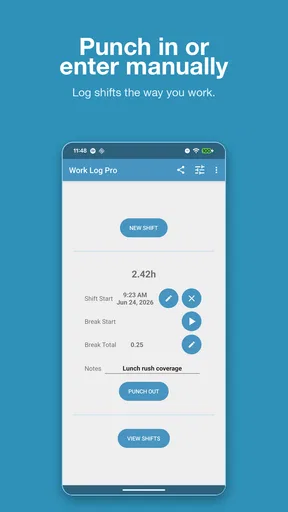
A useful habit is to make the entry part of the shift’s opening and closing routine. I would record the start as soon as I begin, then check the end time before leaving or moving on to another task. If a shift runs late or plans change, fixing the record while the details are fresh is easier than trying to remember the difference the next day.
That routine matters most for workers with irregular hours: a person covering a colleague, working split shifts, or picking up occasional evening work may not have the same daily pattern to rely on. A paper diary can still work, but it is easier to overlook a loose note or misread it later. A dedicated app gives the record a consistent home, provided the user makes a point of maintaining it.
When it is better than a spreadsheet—and when it isn’t
A spreadsheet offers flexibility: I can build custom columns, combine work records with budgets, and shape calculations to fit a particular client. The trade-off is the setup and upkeep. A focused shift log is appealing when I want to record work without designing a small database first. For complex billing rules, multiple approval steps, or shared team schedules, a spreadsheet or specialist workforce tool may be a better fit.
A calendar is another familiar alternative. It is good for seeing when I planned to work, but planned time and actual time are not always the same. Keeping those ideas separate is important: a calendar entry can show an intended shift, while a work log can serve as my record of what I actually did. If I only need a reminder of tomorrow’s hours, a calendar may be enough; if I need to review hours already worked, a dedicated log has a clearer purpose.
Useful checks before relying on the record
Before making this the source I use for invoices or personal pay calculations, I would test a short, ordinary work period and compare the result with my own notes. I would also decide in advance how to handle breaks, shift changes, and work that crosses midnight. Those details can affect totals, and a consistent personal rule is more useful than entering similar situations differently from week to week.
If the app lets me add notes to entries, I would use them sparingly for details that explain an unusual shift, such as a changed finish time. Notes are most useful when they answer a question I might otherwise have later; they become clutter when I repeat information that the time record already makes clear. I would avoid putting sensitive client or workplace information in a personal log unless I genuinely need it there.
What the audience figures suggest
Work Log Pro has a 4.6 average from around 8,400 ratings, with roughly 2,600 written reviews, and more than 100,000 installs. That level of use makes it a familiar choice for a focused work-tracking task, but ratings cannot settle whether it suits a particular employer’s process. I would still check that the app’s way of recording time lines up with what I need to document.
The minimum operating-system requirement is Android 4.0, and the current version is 12. That broad compatibility can matter if someone is keeping an older device in service as a dedicated work phone. I would still make sure the app runs properly on the actual device before depending on it for important records.
Who is likely to get the most value
I’d recommend considering this app if you work shifts that change, want a separate personal record of hours, or regularly need to look back at when you worked. Freelancers and hourly workers may find a focused log easier to maintain than scattered notes, particularly when they establish a consistent entry routine. It may also suit someone who wants a simple personal record alongside an employer’s official system.
I would skip it if your workplace requires a specific timekeeping platform, if other people need to approve or edit your entries, or if you need complex project accounting rather than shift tracking. It is also not the right answer for someone who will not keep the log current: any record becomes less useful when it is filled in from memory days later. In that situation, a method already attached to a daily routine may be more dependable.
My buy-or-skip verdict
At $9.99, I see Work Log Pro as a focused paid option, not an all-purpose work-management system. I would buy it if recording shifts consistently would save me time or help me keep a clearer personal account of hours. I would skip it if a calendar, employer tool, or spreadsheet already handles my needs with less effort.
Its 4.6 average and established user base are encouraging context, not a guarantee that it will fit every job. My advice is to decide what you need the record for before paying: personal reference, checking hours, or organizing shift history are different from formal payroll approval. If the first group describes your need, a dedicated log is a reasonable choice; if the second depends on a workplace process, use the system your employer recognizes.
Getting Started with Work Log Pro
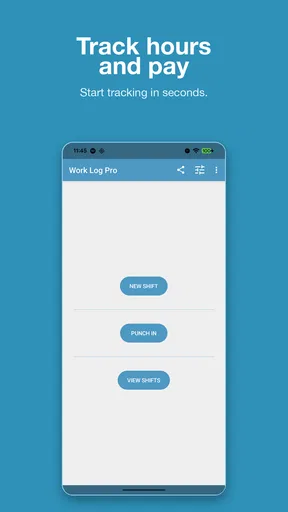
Setting up Work Log Pro is a breeze. After downloading it from your app store, you're greeted with a clean, intuitive interface. It’s like meeting a well-organized friend who’s ready to help you get your life together. You simply start by entering your work hours, and the app does the heavy lifting from there.
User-Friendly Interface
The interface deserves a special mention. It’s straightforward and uncluttered, which makes it easy to navigate, even if you’re not tech-savvy. The dashboard gives you a quick glance at your recent activities, while the menu offers seamless access to all the features. Trust me, you won't be fumbling around trying to find what you need.
Tracking Your Time
The core feature of Work Log Pro is its time-tracking capability. Simply clock in and out, and the app logs your hours efficiently. It’s perfect for freelancers or anyone who bills by the hour. You can also manually add or edit entries if you forget to clock out (we’ve all been there!). This flexibility ensures no hour goes unaccounted for.
Detailed Reports
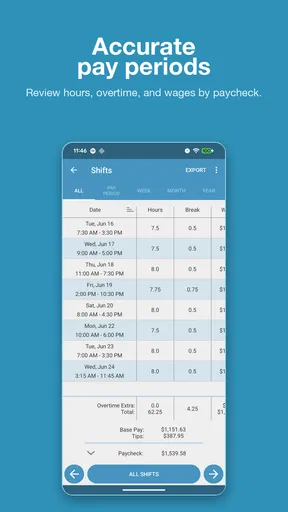
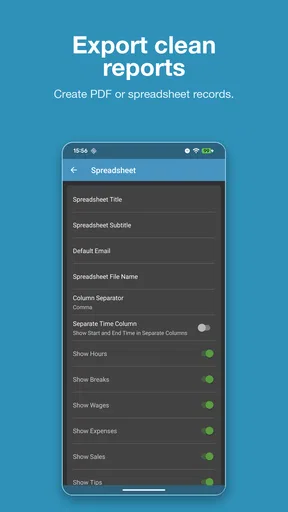
One of my favorite features is the detailed reporting. You can generate comprehensive reports that break down your hours by day, week, or month. This is incredibly useful for understanding where your time goes and making adjustments. Plus, exporting these reports is a cinch, which means you can easily share them with clients or your boss.
Customization Options
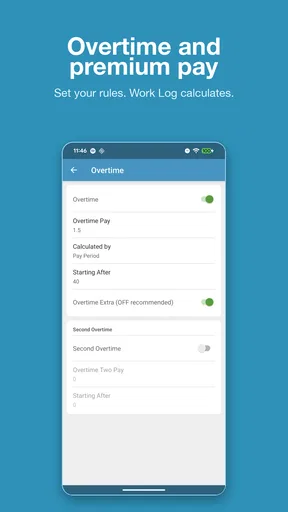
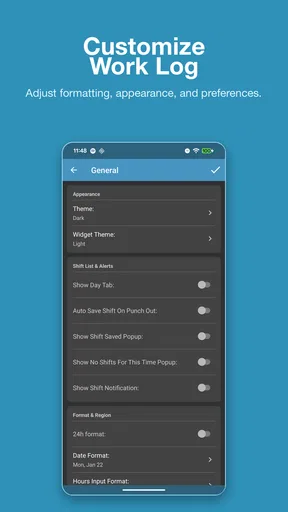
Customization is key, and Work Log Pro doesn’t disappoint. You can set your own work categories, adjust pay rates, and even add notes to each entry. It’s like having a personal assistant who knows exactly how you like things done. This level of personalization ensures the app fits your unique work style perfectly.
Backup and Sync
Worried about losing your data? Work Log Pro offers seamless backup and sync options. You can connect it to your cloud account and rest easy knowing your data is safe and accessible from any device. It’s a reassuring feature for anyone who’s ever lost a spreadsheet or two.
Notifications and Reminders
Never miss a clock-in again with the app’s notification and reminder features. These gentle nudges ensure you stay on top of your schedule without feeling overwhelmed. It’s like having a friendly reminder from a colleague, keeping you in check throughout the day.
Pricing and Availability
Work Log Pro offers a free version with basic features, which is great for testing the waters. For those looking to dive deeper, the premium version unlocks all functionalities. It’s reasonably priced and offers great value considering the time and stress it can save you.
In conclusion, Work Log Pro is more than just a time tracker. It’s a comprehensive tool that helps you manage your work-life balance efficiently. Whether you’re a freelancer, a business owner, or someone who simply wants to take control of their schedule, this app is a must-have. Give it a try, and you might just find yourself wondering how you ever got by without it.
Verdict
Strengths of Work Log Pro
- Easy-to-use interface enhances productivity.
- Tracks multiple projects simultaneously.
- Customizable notifications for task reminders.
- Detailed analytics for work patterns.
- Integrates with popular calendar apps.
Limitations of Work Log Pro
- Limited offline functionality.
- Subscription required for advanced features.
- Occasional sync issues with cloud storage.
- No integration with team collaboration tools.
- Interface may feel cluttered on smaller screens.
Similar Picks in This Category
View All
Google Calendar
Google LLC4.6

Google Drive
Google LLC4.3

Google Assistant
Google LLC3.9

Microsoft OneDrive
Microsoft Corporation4.6

Samsung Calendar
Samsung Electronics Co., Ltd.4.1

Microsoft OneNote: Save Notes
Microsoft Corporation4.6
Frequently Asked Questions
What is Work Log Pro used for?
Work Log Pro is designed to help users track their work hours efficiently. It allows you to log hours, monitor your productivity, and generate reports for better time management. Ideal for freelancers, remote workers, or anyone who needs to keep track of their working hours.
Can I export my work logs from Work Log Pro?
Yes, Work Log Pro offers exporting options for your logged hours. You can export your data in various formats, such as CSV or PDF, making it easy to share with employers or integrate with other time management tools.
Is Work Log Pro available on both Android and iOS?
Work Log Pro is available for both Android and iOS devices. You can download it from the Google Play Store or the Apple App Store, ensuring that you can manage your work hours no matter which platform you use.
Does Work Log Pro have a reminder feature?
Indeed, Work Log Pro includes a reminder feature to help you log your hours consistently. You can set reminders for specific times or intervals, ensuring you never forget to record your work hours, which is crucial for accurate time tracking.
Is my data safe with Work Log Pro?
Work Log Pro prioritizes user data security by employing encryption and secure storage measures. Your work logs and personal information are protected, ensuring that only you have access to your sensitive data. Regular updates also enhance the app's security features.
